Change dmFax divert settings
See below for help with configuring your dmFax divert settings.
Change dmFax divert settings online
1) Log in to your Clubhouse
2) Click on the icon for your dmVoice number
3) Click on the 'Divert' tab
You will see a panel like this:
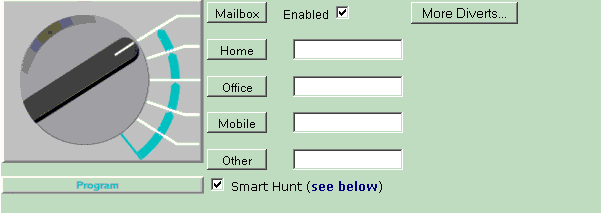
4) Configure your dmFax divert numbers and settings. See below for more information on the settings.
Number Divert Controls
The Divert switch: the divert switch shows the first destination to which your calls are currently diverting to. In the example above, any incoming calls to this Number will be diverted directly to the Unified Messaging Mailbox.
Description of the divert setup: this message explains what will happen to a live call including what will happen if you don't answer the call.
Mailbox, Home, Office, Mobile, Other: click on the appropriate button to set your live calls to be diverted directly to that location (also disables Program Mode) and type in, modify or delete the phone numbers.
More Diverts: Click on this to open a field where you can add additional divert destinations
Smart Hunt: This enables the system to search for you at different phones, it is sometimes also called 'Hunting'. Program Mode is where your number tries different diverts depending on the time of day. If you don't answer at the first divert, it will try your other diverts (if specified) in the order shown below.
| Call Time | Hunt Sequence |
|---|---|
| During Office hours (Mon - Fri, 8:30-18:00) | Mobile -> (Other) -> Office -> Mailbox |
| At other times | Mobile -> (Other) -> Home -> Mailbox |
Mailbox enabled: by default your dmVoice mailbox is enabled. With Mailbox enabled, the service will hunt for you until you accept a call by pressing '#'. Disable this option if you don't wish to use your dmVoice mailbox. For example, if you want to receive voicemail messages on a different mailbox (eg your mobile) you would disable this setting.
Save: don't forget to click Save to activate your changes.
Change dmFax divert settings by phone
You can program up to 6 numbers into your Personal Number over the phone
To setup a new divert or change an existing divert:
1 Dial your Control Number - 08700 885 445 (click here for more help on accessing your Control Number)
2 Enter your dmFax number and PIN followed by #
3 Press 4 to go to the Setup Diverts menu
4 Select which divert to setup (1 Home, 2 Office, 3 Mobile)
5 Enter the full divert telephone number (including area code) then press #
6 Listen to the control menu to confirm the number is correct and press #
Special note: Some of your diverts will have been automatically set up using the information you gave when you registered your dmFax number.