Getting started with VoIP with dmConnect classic
Menu
-
Setting up your VoIP divert
-
VoIP forwarding
-
PSTN forwarding
-
Troubleshooting VoIP
-
VoIP Server configuration hints
Setting up your VoIP divert
his is the Divert tab of your Number Control Panel. You can use this page to set the destination where calls to this number should be diverted:
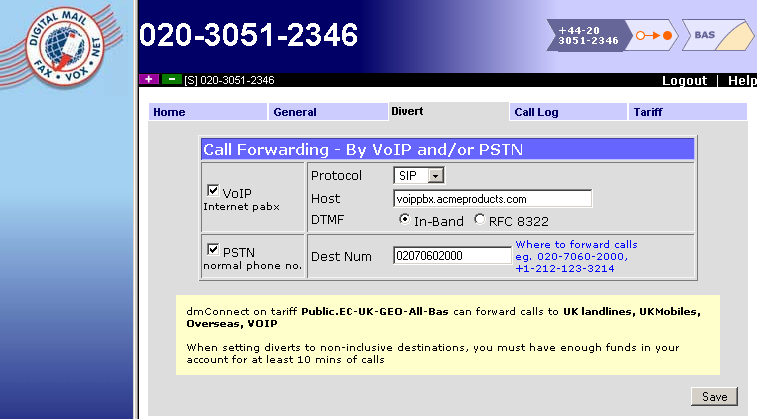
Always click Save to activate any changes you make!
Note: changes to the type of divert destination (PSTN/VoIP) may take a few seconds to take effect
VoIP forwarding
This is where you set forwarding of your calls via IP to a VoIP server. Tick the "Voip - Internet PABX" box to enable this feature.
Protocols
- SIP - A widely used protocol for VoIP. Fairly simple to setup but can struggle to get through firewalls and routers.
- IAX2 - A protocol most closely associated with the Asterisk Open Source PABX package (and derivatives thereof). Slightly more complex setup but designed to improve access through firewalls / routers.
SIP Parameters
- Host - the address of your VoIP server/PABX as an IP address (e.g. 87.215.32.121), or a hostname (e.g. pabx.acmeproducts.com).
- DTMF - Whether DTMF tones should simply appear in the audio stream (in-band) or as explicit protocol signalling (RFC 8322). This setting often doesn't matter, but if you are having trouble with a tone-driven application on your system, changing this setting may help.
IAX2 Parameters
- Username - the IAX2 username (sometimes referred to as "user context")
- Password - the IAX2 password (sometimes referred to as "secret")
- Host - the address of your VoIP server/PABX as an IP address (e.g. 87.215.32.121), or a hostname (e.g. pabx.acmeproducts.com).
PSTN Forwarding
You can set up a standard PSTN divert as a backup if you wish (but if you have both set up, your VoIP divert will always be tried first). Details of configuring your number to divert by the PSTN (Public Switched Telephone Network - an ordinary phone line) can be found in dmNote 3211: instructions for ControlX/DMCDivert
Troubleshooting VoIP
VoIP can be tricky. If you want to check the number itself is working and you have doubts about your server setup or its connectivity, you can copy the following information into your VoIP forwarding settings to access our test service:
SIP Testing Parameters
| Protocol | SIP |
| Host | voiptest.dmclub.net |
| DTMF | In-band |
IAX2 Testing Parameters
| Protocol | IAX2 |
| Username | test |
| Password | test |
| Host | voiptest.dmclub.net |
Calls should be answered immediately with a "congratulations" message followed by an echo-test (the system plays back to you what it hears as quickly as it can - usually within about 0.2s). If this is what you hear, then your dmClub number is working correctly.
VoIP Server configuration hints
Firewall access
You should open up your VoIP server's firewall to all access from the following IP addresses, using SIP (UDP) on port 5060, RTP (UDP) on ports 16384-32767:
87.238.72.129
87.238.72.130
87.238.72.131
87.238.72.132
87.238.72.151
87.238.72.153
87.238.73.129
87.238.73.130
87.238.73.131
87.238.73.132
87.238.74.129
87.238.74.130
87.238.74.131
87.238.74.132
If you wish to use IAX, then add the following as well:
87.238.72.154
87.238.72.140
87.238.73.140
87.238.74.140
In addition, RTP traffic may originate from any of the IP addresses contained in the following subnets:
87.238.72.128/26
87.238.73.128/26
87.238.74.128/26
87.238.77.128/26
213.166.5.128/26 (old
If you firewall UDP traffic on your network you must ensure the above subnets are permitted.
Example Asterisk script
in /etc/asterisk/sip.conf:
[dmclub-SIP]
type = peer
context =from-dmclub
host=213.166.5.129
allow=alaw,ulaw
dtmfmode=inband
in /etc/asterisk/extensions.conf:
[from-dmclub]
exten => _X., 1, Answer
exten => _X., 2, Playback(demo-congrats)
exten => _X., 3, Hangup
Please note that we do not support Asterisk, and this is a friendly hint to VOIP PABX-savvy professionals.
Technical VOIP features that we support
- Inband DTMF signalling
- CLI signalling
- IAX2
- G.711 codec (A-Law & u-Law)
Technical VOIP features that we do not currently support
- Outbound VOIP (the ability to initiate VoIP calls)
- VOIP registration of individual handsets to our servers
Router/Firewall setup tips
- In general - disable ALG if you can
- Cisco routers (eg. RV110W) - disable DoS Protection in the Firewall/Basic settings if you have Linksys/Sipura handsets