Voucher API demo and sample code
The Voucher API is used to generate vouchers for your customers entitling them to dmClub special offers. When driven correctly with valid parameters it returns a RedeemURL, which leads to one of our sales sites (running under your dealership) with the customer's voucher code already "filled in".
The API demo
The voucher manual issue page doubles-up as an API demo. It shows the parameters you can send to the Voucher API, and it's response in raw, XML and decoded formats. It should help you get comfortable with the data that gets sent back and forth.
Before trying the API demo:
Contact your dealer manager for a Voucher Pack, as this includes the API documentation and some test credentials (values to use for VoucherID and SerialID).
Take a look at the API demo here.
Limitations of the demo
Our current demo has several limitations which we may address in the future.
- It doesn't come with built in test data. You have to fill in the form fields.
- It doesn't show you the complete list of parameters you can send.
- It doesn't allow various failure modes to be simulated (e.g. communication failures, unexpected & undecodable responses)
Sample PHP code for talking to the API
Download the source code for the Voucher API Demo. This should give your web developer a head start when it comes to integrating the Voucher Issue Request into your website's sales process.
What's included in the download
The download consists of 6 files, as shown below.
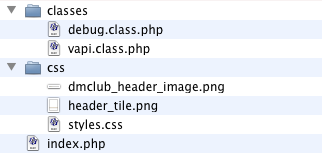
index.php contains the form shown in the API demo, and shows how to use the Voucher API class to talk to the API.
vapi.class.php is a class that talks to the Voucher API and decodes it's response. It does most of the hard work for you.
debug.class.php is a utility class used by vapi.class.php to log debugging messages, as seen in the Debugging section of the Demo.
styles.css is a simple stylesheet for the demo page.
The two .png files just create the graphic header.
Requirements
PHP 5 or above, with
- cURL extension
- Simple XML extension
Sending a request to the Voucher API using vapi.class.php
Lines 20 - 53 of index.php show the basic usage of the Voucher API class (vapi for short). In the demo most of the request parameters are set from submitted form values, taken from the $_REQUEST super-global.
Normally you would set the parameters from variables representing your customer's name, email, etc.
SerialID, VoucherID and CustEmail are required, the other parameters are optional.
// Call in the VAPI class
require_once('classes/vapi.class.php');
// Initialise the class - pass TRUE to turn debugging on, or no arguments for debugging off
$vapi = new Vapi(TRUE);
// Set the request parameters
// Some hard-coded example values are shown, but you'll need to set these to appropriate values
// (normally from variables containing SerialID, VoucherID and customer information)
$vapi->p->SerialID = '13Sep0024'
$vapi->p->VoucherID = 'UUFP-ZXWG-XNR3-1N64-H9CR';
$vapi->p->SendVoucherEmail = 'Y';
$vapi->p->CustTitle = 'Mr';
$vapi->p->CustCName = 'Thomas';
$vapi->p->CustSName = 'Smith';
$vapi->p->CustEmail = 'tom.smith@somedomain.com';
$vapi->p->CustPhone = '020 7060 2000';
$vapi->p->CustPostcode = 'EC1Y 2BJ';
// Send the Voucher Issue Request
$vapi->issue();
Using the response
The VAPI class decodes the response from the Voucher API, setting result and error class variables.
$vapi->result
is an object containing the decoded response.
In particular, $vapi->result->Result is set to OK or FAIL, depending on whether the voucher was issued or not
If set to OK, $vapi->result->VoucherID and $vapi->result->RedeemURL will also be set.
$vapi->error on the other hand is set when a communication error occurs, or when the response could not be decoded. Otherwise it's NULL.
By examining $vapi->result and $vapi->error you can write code that responds to the success or failure of the Voucher Issue Request. It'll probably look something like this...
if ($vapi->error || isset($vapi->result->Result) && $vapi->result->Result == 'FAIL')
{
// Handle the error
// ...
}
else if ($vapi->result->Result == 'OK')
{
// The voucher issue request succeeded
// ...
// You might want to record the fact that the customer has been given a voucher in your database
// It's entirely up to you
}
Response examples
Response example: request succeeds
$vapi->error is NULL
print_r($vapi->result) gives...
stdClass Object
(
[Result] => OK
[VoucherID] => IRTD-0WP2-VGQ2-WMO3-MFV6
[SerialID] => 13Oct0022
[DMIDCreated] => Y
[SentEmail] => Y
[RedeemURL] => http://OwnTestDealership.getbusinessline.com/?voucher_id=IRTD%2D0WP2%2DVGQ2%2DWMO3%2DMFV6
)
Response example: request fails due to a bad VoucerID (but communication and decoding response succeeds)
$vapi->error is NULL
print_r($vapi->result) gives...
stdClass Object
(
[Result] => FAIL
[Reason] => Unable to find voucher [voucherID:1111-2222-3333-4444-5555]
)
Response example: badly formed response (decoding response fails)
$vapi->error is BADLY FORMED XML
print_r($vapi->result) gives an empty object
stdClass Object
(
)
Using the debugging
If you pass TRUE to the vapi class when you initialize it then it will record the request and response in it's debugging buffer, which can be helpful during development or troubleshooting.
To output the debugging buffer onscreen...
// Output the debugging
$vapi->debug->display();
In the API demo the debugging is shown under the form at the bottom of the page (you'll have to scroll down to see it).