Introduction to eComponents
This video is taken from one of our eCom 2.0 dealer webinars.
It shows a Number Chooser being configured and added to a demo sales site. You can then see how the Number Chooser works together with the Mini Trolley and Checkout eComponents to take the customer through the sale.
To find out more about eComponents, join a webinar or read the short introduction below.
Join a webinar
We're running regular webinars to tell you about how eCom 2.0 can benefit you.
For upcoming dates and times and how to join a webinar, click here.
Tell me more...
Click on a link to jump to a section.
How it worked before eComs
So what's changed?
What's in it for me?
Are eComponents for me?
How do I get started?
What are the eComponents?
Number Chooser
Checkout
Mini Trolley
Call Cost Explorer
Dealer Registration
Universal Product
Advanced Features
How it worked before eComs
Before we released eComponents, you could choose to sell dmClub products in the following ways:
- Via the Adapted sales site, that you can download and modify to suit your brand
- Via the Affiliate sales site, which is automatically created for you when you sign up as a dmClub dealer, but which has limited scope for modification.
So what's changed?
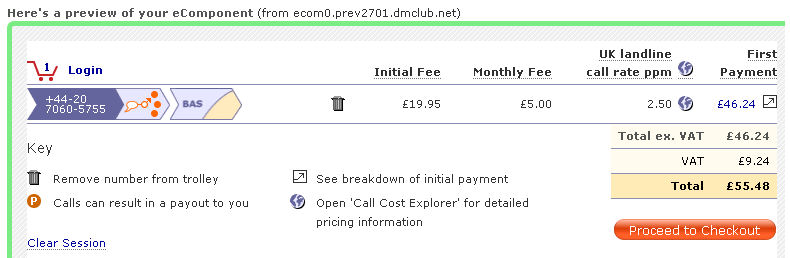
An example of the Checkout eComponent, as it's displayed in the Preview section of the wizard.
What's changed? Now, along with the Adapted and Affiliate sales options, you can choose to sell dmClub products and services using eComponents.
With eComponents, you can build your own site, entirely to your own specifications, to describe and promote dmClub products and services. But you don't need to worry about creating the number chooser, registration and checkout components: simply configure and embed the relevant eComponents into your site.
And as eComponents are hosted by us, there's no need to make changes on your server when a release is updated.
What's in it for me?
- Take control over layout, SEO and content on your sales site
- Quick and easy to create targeted microsites for niche campaigns
- Avoid the affiliate content trap
- No changes to your server when eComponents are upgraded
- Stand out from the crowd
Are eComponents for me?
If you know enough about website design to create a simple site using HTML or a content management system such as Drupal or Joomla, then yes - eComponents are definitely for you!
How do I get started?
Have a read through the Introduction pages here in dmNotes. Then go take a look round the eComponents. Follow the instructions here to access the Marketing Resources Wizard and start exploring the eComponents.
What are the eComponents?
The eComponents are designed to cover all the functionality you need throughout the selling process: from browsing and selecting numbers through to registration and checkout. Below is a quick guide to what's on offer.
Number Chooser
What does it do?
The Number Chooser eComponent presents a range of numbers to your customers. They can then choose one or more, before proceeding to the Checkout.
Using the Wizard, you can set the range, service and plan offered in the Number Chooser, and decide whether or not you want to sell Gold (memorable) numbers.
Where can I find out more?
Click here to find out more about the Number Chooser.
Checkout
What does it do?
The Checkout enables your customers to
- Configure their service and plan
- View example invoices
- View the Call Cost Explorer
- Create an account and then pay for their number/s.
Where can I find out more?
Click here to find out more about the Checkout eComponent.
Mini Trolley
What does it do?
True to its name, the Mini Trolley is...a small trolley. It's a mini-widget that displays the number of items in the customer's trolley, and their value. When the customer clicks on it they are taken to the Checkout eComponent.
Where can I find out more?
Click here to find out more about the Mini Trolley eComponent.
Call Cost Explorer
What does it do?
The Call Cost Explorer enables the customer to enter a destination number, and find out the costs of diverting a dmClub number to that number. It's useful if customers want more information about the running costs of a service.
Where can I find out more?
Click here to find out more about the Call Cost Explorer eComponent.
Dealer Registration
What does it do?
If you're a Pro or Wholesale dealer, you can start building your own dealer network and earn commission from their sales as well as your own. If you're building a dealer network, you can use the Dealer Registration eComponent to sign up new dealers.
Where can I find out more?
Click here to find out more about the Dealer Registration eComponent.
Universal Product
What does it do?
The Universal Product eComponent enables you to sell products other than phone numbers. At present you can use the Universal Product eComponent to sell dmAnswers and Number Porting services to your customers.
Where can I find out more?
Click here to find out more about the Universal Product eComponent.
You mentioned advanced features. Tell me more...?
We've designed the eComponents to be straightforward and quick to use. For more advanced users, though, there are further features available to help you customise and track your eComponent-based sales campaigns.
Please note: these are only brief introductions - to find out more, join an eCom 2.0 webinar.
Campaign Tracking (Advanced)
What does it do?
The Campaign Tracking eComponent is a bit different to the others, as it's not visible on the page. It's a snippet of Javascript that you can paste into the <head> area of your web pages, that helps you track the results of different campaigns.
Where can I find out more?
Click here to find out more about the Campaign Tracking eComponent.
Cascading Style Sheets (Advanced)
For those of you who are wizards with CSS, there's an option to customise the eComponents' style sheets.
For more information about customising eComponents CSS, click here.
Arbitrary extra parameters (Advanced)
There are plenty of options for configuring your eComponents using the Wizard. But the eComponents will take a fair few more parameters than we've allowed for within the Wizard itself. For
more information about adding your own custom parameters, you'll need to request the eCom Reference Guide.
eComponent Reference Documentation
For advanced users who are keen to understand the eComponents inside out, an eComponent Reference Guide is available on request. Contact your Account Manager for more information.