Getting started with eComponents
eComponents are designed to be straightforward to use, but as they're pretty flexible and powerful there's a range of new concepts and options to get used to. On this page you'll find some basic tips for getting to know the eComponents.
Can someone talk me through the eComponents?
Yes - join one of our eComponent webinars and we'll run you through how they work.
Where do I find the eComponents?
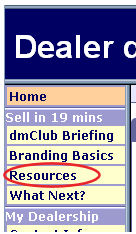
1) Log into your Dealer Admin control panel via your Clubhouse. Then click on Resources to open the Marketing Resources Wizard.
2) When the Wizard opens, you'll be asked to choose which type of resource you'd like. Select 'eComponent'.

How do I start exploring the eComponents?
The Marketing Resources Wizard is designed to take you step by step through the process of creating and configuring an eComponent.
The best way to get a feel for the eComponents is to create a test site, or a few test pages on an existing site, and then spend a bit of time exploring the Wizard. Start out by creating a few different types of eComponent, and get a feel for how they work together.
How do I get to the Showcase?
Another important way to start exploring is to take a look at the Showcase sites. You can access this from the Marketing Resources wizard:
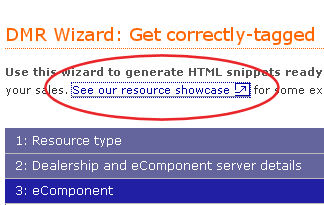
The Showcase includes
A simple sales site built using eComponents, to give you an idea of how you might structure your own
A demo showing how you can restyle the eComponents CSS (Advanced feature)
Tutorials showing you how to track, test and analyse your marketing results.