Affiliate site text substitutions
The affiliate site's text substitution engine allows dealers to use their own brandname and contact details on their affiliate sites.
All dealers using the affiliate sites will want to complete these instructions.
Contents
the web marketing options video at 3m 55s
Objectives
Duration and skill level
Theory
Setup data
Step 1:Go to dmAdmin
Step 2: Select 'Branding All'
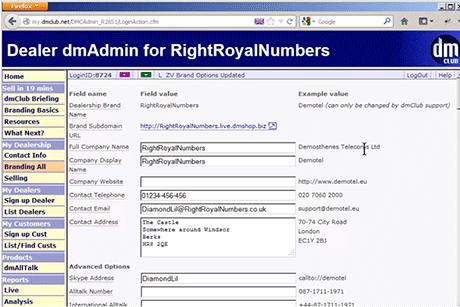
Step 3: Fill in your details
Step 4: Go to your affiliate site to see the results
Troubleshooting
Related content
Objectives
Use this guide to
- Get your brandname and contact details on to your affiliate site.
Duration and skill level
10 minutes. Basic (no special skills required).
Theory
Each affiliate site has a text substitution engine that replaces tokens in web page content with string values, e.g.
- {{company_fullname}} with your company name
- {{contact_tel}} with your telephone number
Setup data
| Parameter Name | Usage | Example | Rule & Origins |
|---|---|---|---|
| Brand Name |
Used for your automatically allocated affiliate subdomain |
electrocom |
Alphanumeric, starting with a letter. Up to 16 characters. No spaces, hyphens or underscores allowed. |
| Full Company Name |
Content | Electrocom Communications Ltd |
Alphanumeric. Spaces and hyphens allowed. |
| Company Display Name |
The name of your company as displayed to customers in affiliate site's header |
ElectroCom | Alphanumeric. Spaces and hyphens allowed. |
| Company Website |
The URL of your website, if you have one |
http://www.electro.com | A valid web address |
| Contact Telephone |
A number customers can call you on | 020 7060 2000 |
This comes from your telecoms supplier. |
| Contact |
An email address that customers can use to contact you | info@electro.com |
Valid email address. |
| Contact Address |
Postal address for correspondence |
ElectroCom 11 Electric Avenue Brixton BR1 808 |
Alphanumric, spaces and linebreaks allowed. |
| Skype Address |
Your Skype ID, dmABS only |
john.orlando.groats | You create this when you sign up for Skype. |
| AllTalk Number |
dmAllTalk enables you to earn money by hosting conference calls, by giving you a dmAllTalk Dealer Access Number that customers dial into for calls. dmABS only |
087-1711-1971 | If you've applied for a dmAllTalk Dealer Access Number (DAN), it will be listed here. (For more information, see the dmAllTalk option on the left-hand menu). |
| International AllTalk Number |
As above, but a geographic number that doesn't generate revenue. dmABS only |
+44-87-1711-1971 | If you applied for one it will be listed here. |
| Alltalk PPM |
The cost of calling the AllTalk number dmABS only |
9 | Pence-per-minute. 8, 9 or 10.
|
| Site Theme |
dmABS can use one of two graphic colour themes dmABS only |
Baseline | You choose from Baseline and Demotel. |
| Header Block Colour |
The background colour of the header block on dmABS, where the company display name and contact details appear. dmABS only |
#FF3322 | RGB colour value expressed in hexadecimal. |
| Header Background Image URL |
The URL of a background image that is tiled in the header block of dmABS (behind the company name or company logo) dmABS only |
http://www.mysite.com /assets/dmabs /header_bg.gif |
A valid URL. |
| Company Logo URL |
The URL of acompany logo image file for dmABS. This will be used instead of Company Display Name if supplied. dmABS only |
http://www.mysite.com /assets/dmabs /logo_for_abs.png |
A valid URL. |
| eCom Stylesheet URL |
The URL of an override stylesheet to use with eComponents. | http://www.mysite.com /assets/css/ecom.css |
A valid URL. |
| Site Stylesheet URL |
The URL of an override stylesheet to use with your affiliate sites. | http://www.mysite.com /assets/css/affiliate.css |
A valid URL. |
| Google Analytics Account Number |
A Google Analytics account number to use with dmABS dmABS only |
UA-1234-6 | This comes from Google when you sign up for a Google Analytics account. |
| Display Dealer Tab |
Should dmABS display a dealer signup tab, so you can signup sub-dealers dmABS only |
Yes | Choice of Yes or No. |
| Fully Qualified Domain Names |
One or more domains to which these branding details should be delivered. Fill this in if you are pointing one or more of your own domains at any of the affiliate sites. |
sb.electro.com | Valid domains name(s) without http:// at the start |
Step 1: Go to dmAdmin
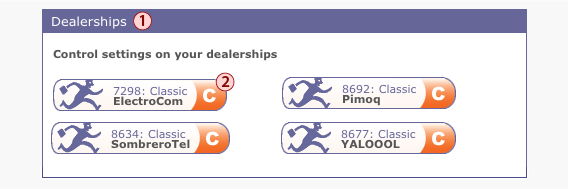
Go to dmAdmin, your dealer admin area.
a) Log into your clubhouse and find the Dealerships panel (1)
b) Click the dealer icon (2) for the dealership you're using
(if you're a new dealer you will probably have only one dealership)
c) dmAdmin will open in a new tab or window
Step 2: Select 'Branding All'
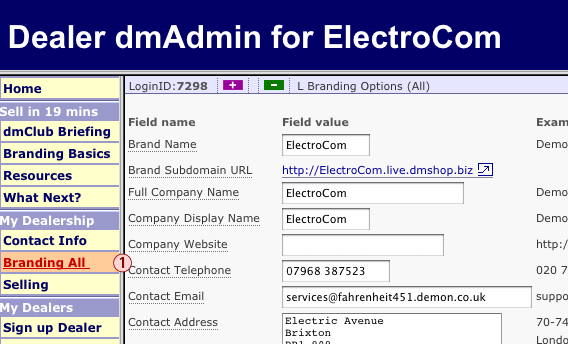
Click on Branding All (1)
Step 3: Fill in your details
Fill in your company's details, using the Setup Data section above as a reference.
If you intend to use the older dmABS affiliate site as well as the newser generation of affiliate sites complete as many fields as possible. If you intend to use the newer affiliate sites only you can skip the fields marked 'dmABS only' in the Setup Data table.
Click Save when you are finished.
Step 4: Go to your affiliate site to see the results
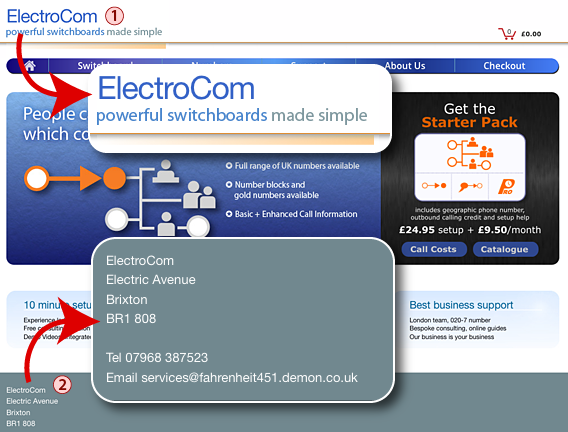
Go to your affiliate site at http://<Brand Name>.dmswitchboard12.com.
You should now see your compnay's display name in the site's header bar at the top of each page (1), and your company's full name, address, contact number and email in the footer at the bottom of each page (2).
Troubleshooting: my text substitutions don't get updated
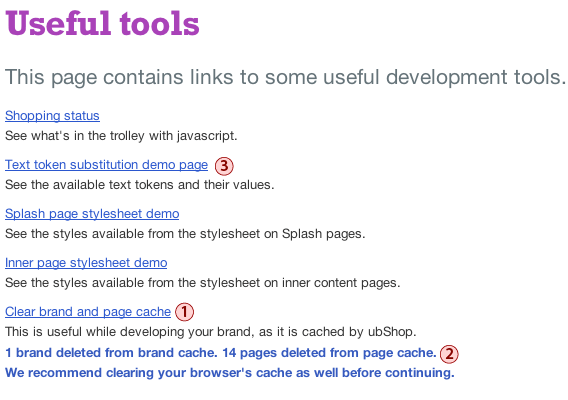
The affiliate site caches your text substitutions. If you make changes to text substitions but their values remain unchanged on your site you need to:
- clear the brand and page cache
- then clear your browser's cache.
Go to the tools page on your affiliate site at http://<Brand Name>.dmswitchboard12.com/tools
Click Clear brand and page cache (1)
After clearing the caches the page will give you feedback (2)
Now clear your browser's cache. How to do this varies by browser (Google it if you don't know how).
Take a look at the Text token substitution demo page (3) to check the current values of your text substitutions, as well as checking the site header and footer as described previously.
Related content
#5107 Affiliate sites introduction
#5109 dmswitchboard12.com on your own domain