Instructions for ControlX/VoiceSettings
Voice Settings
Special Options
These are the special options available for voicemail. It is not necessary to select any of the options.
Long (10 mins): enable this option to allow your callers to leave messages up to 10 minutes long, rather than the standard 2 minute maximum length.
Long (5 mins): enable this option if you wish to record a voicemail message (we call it your Outgoing Message or OGM for short) that is up to 5 minutes long. See dmNotes for instructions on how to record your own voicemail message
Very Long (10 mins): enable this option if you wish to record a voicemail message that is up to 10 minutes long
Notification
When a message arrives, the system can send you an email or SMS message (Pro users can have several notification messages sent).
Use the checkbox(es) to turn notifier on/off. For SMS notification, enter the mobile number in international format (eg 447775911500).
SMS messages are charged at 9p each
Upload OGM
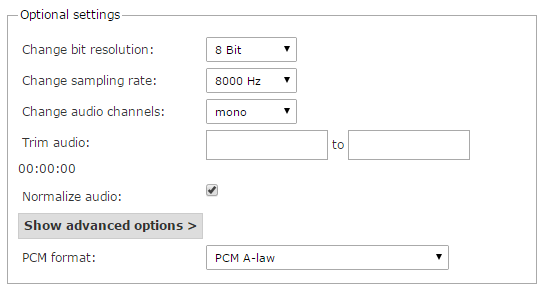
You can upload a .WAV file of your OGM using this facility. It must be in a particular format:
- 8kHz 8 bit PCM A-Law Mono
To get a file into that format, you can use various tools (eg. Audacity, Goldwave, etc) or an online converter such as that found at http://audio.online-convert.com/convert-to-wav. If using this one, the optional settings are: